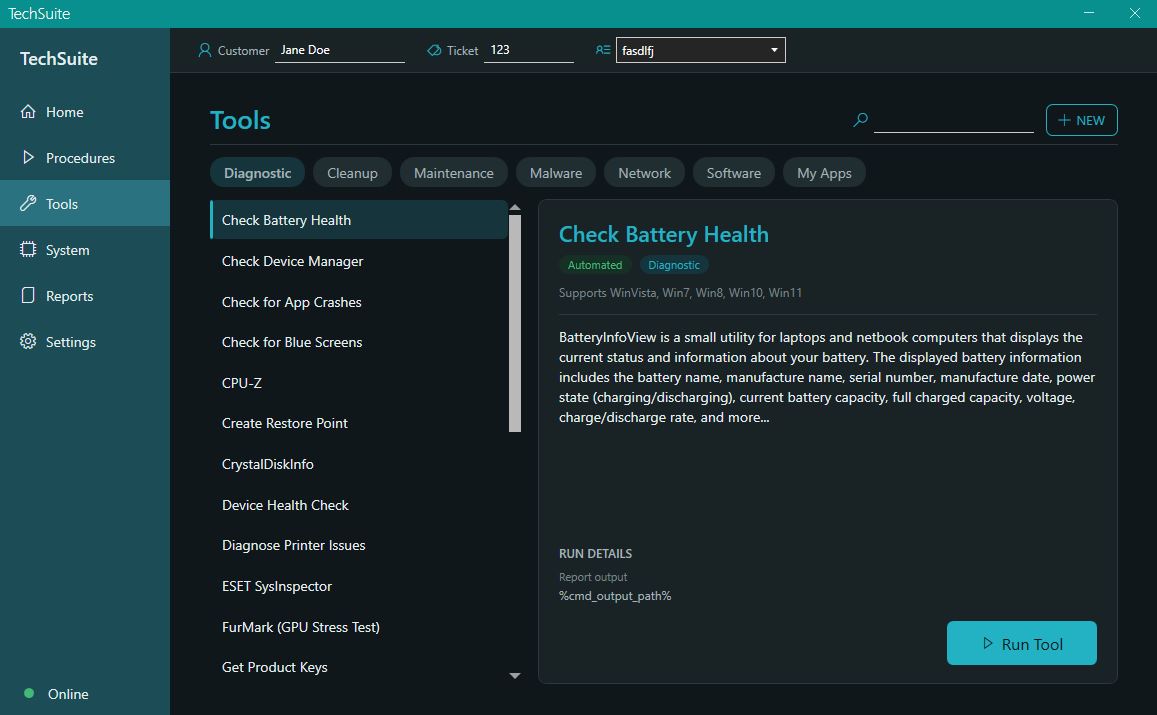
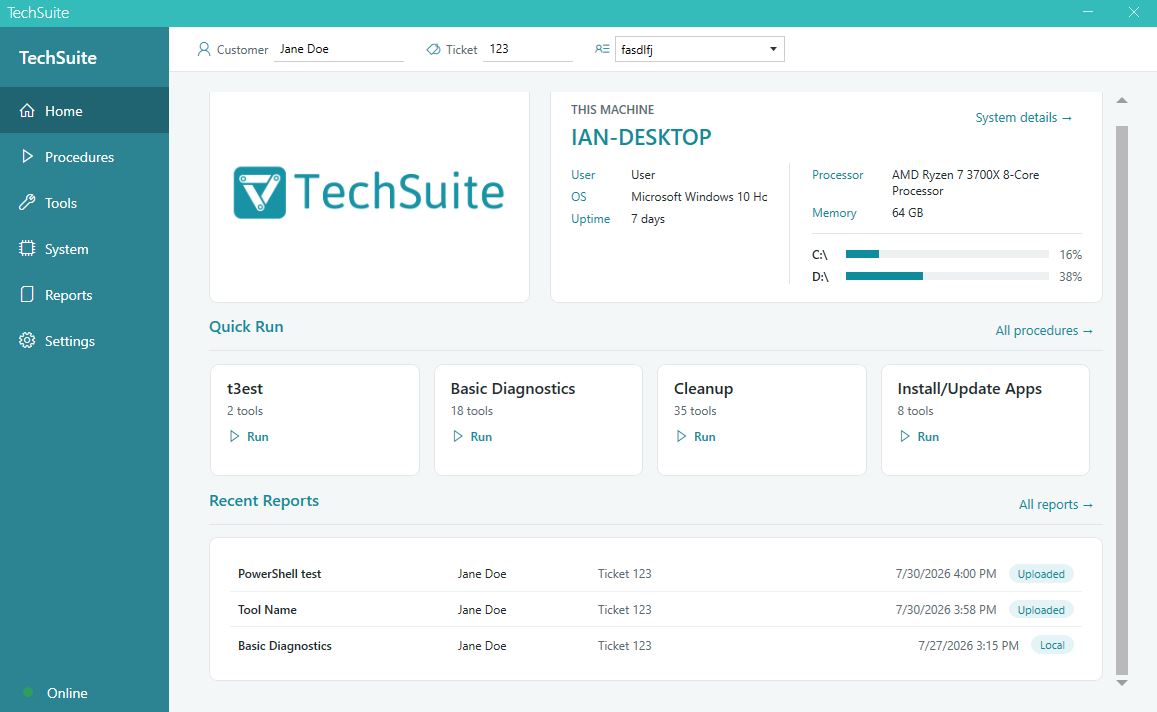
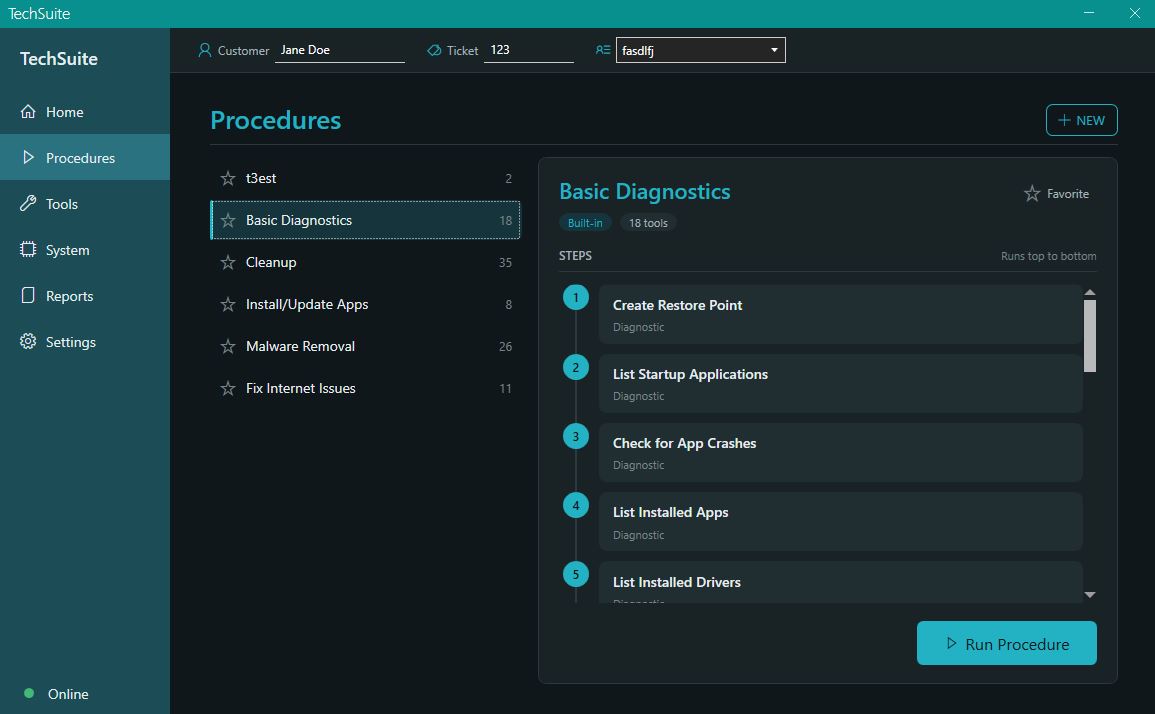
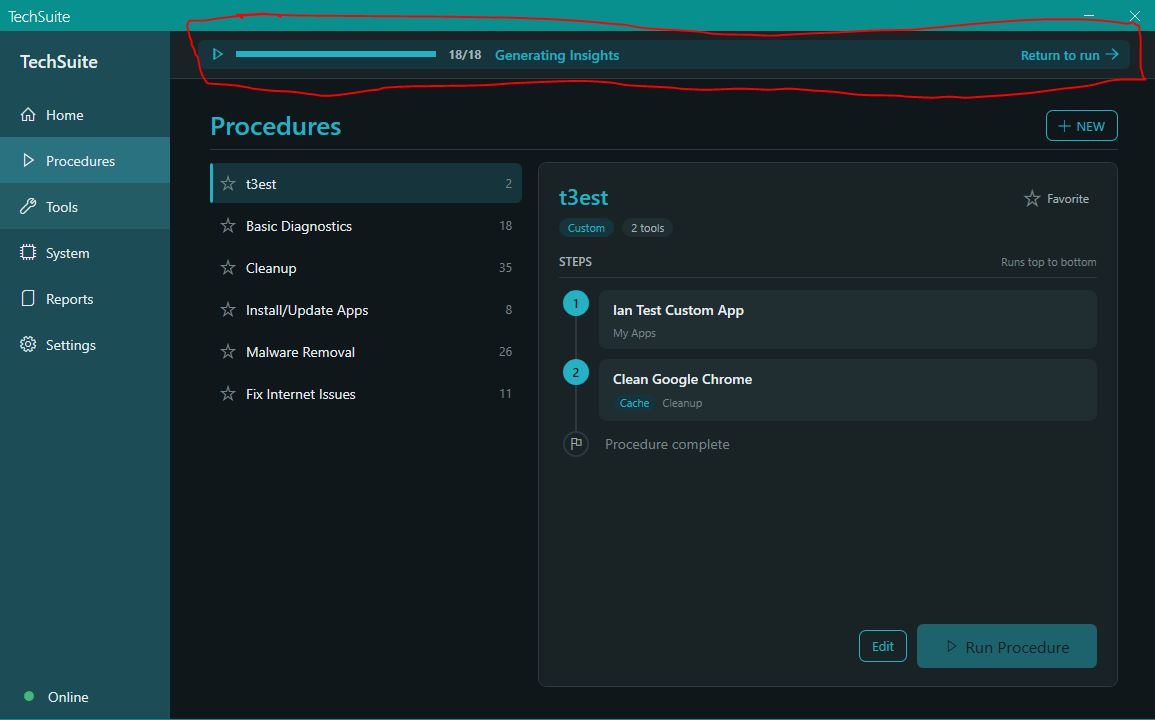
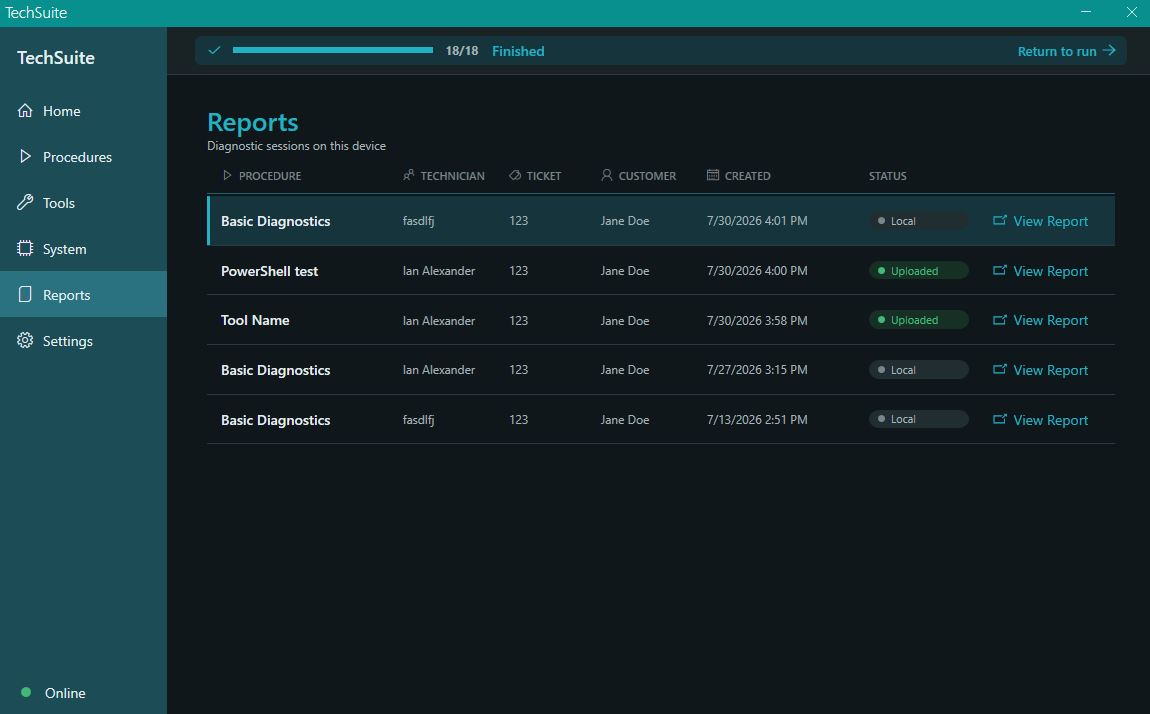
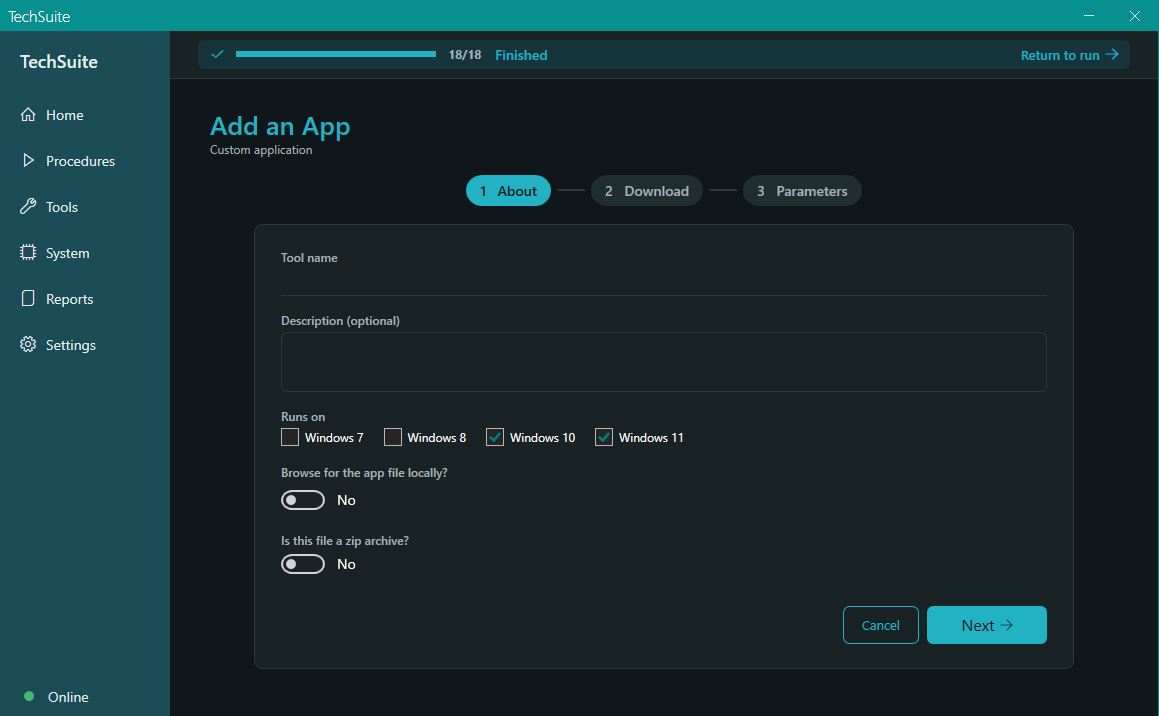
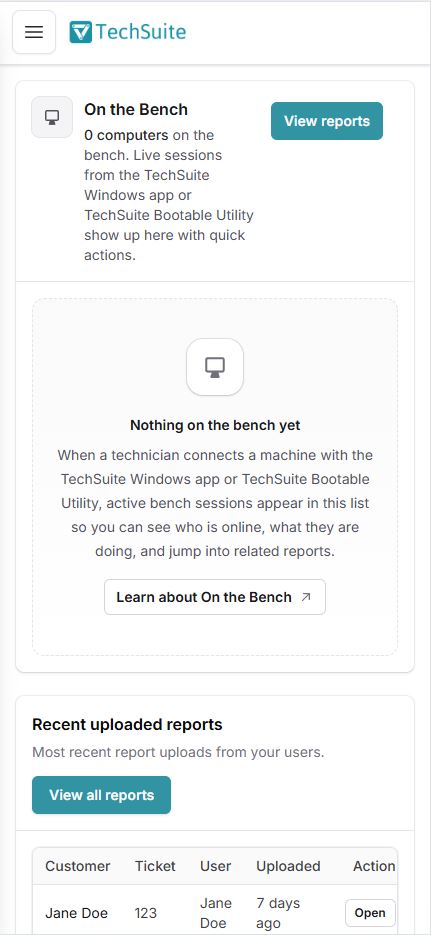
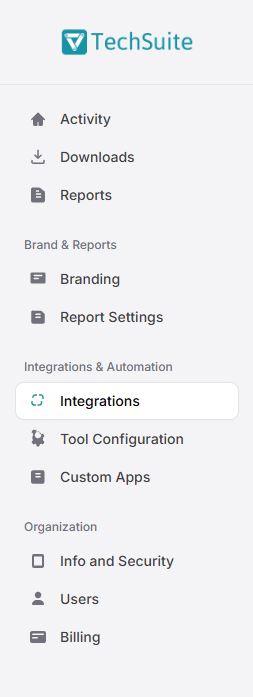
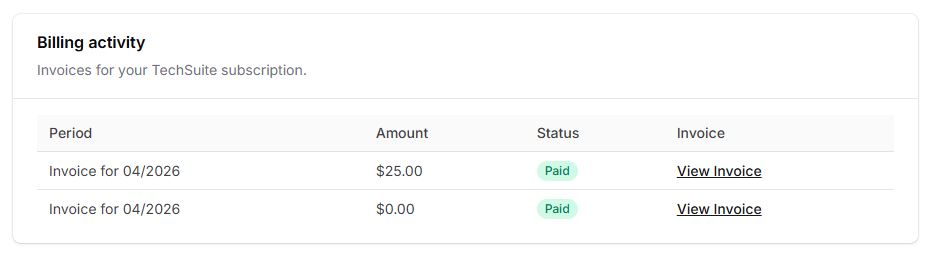
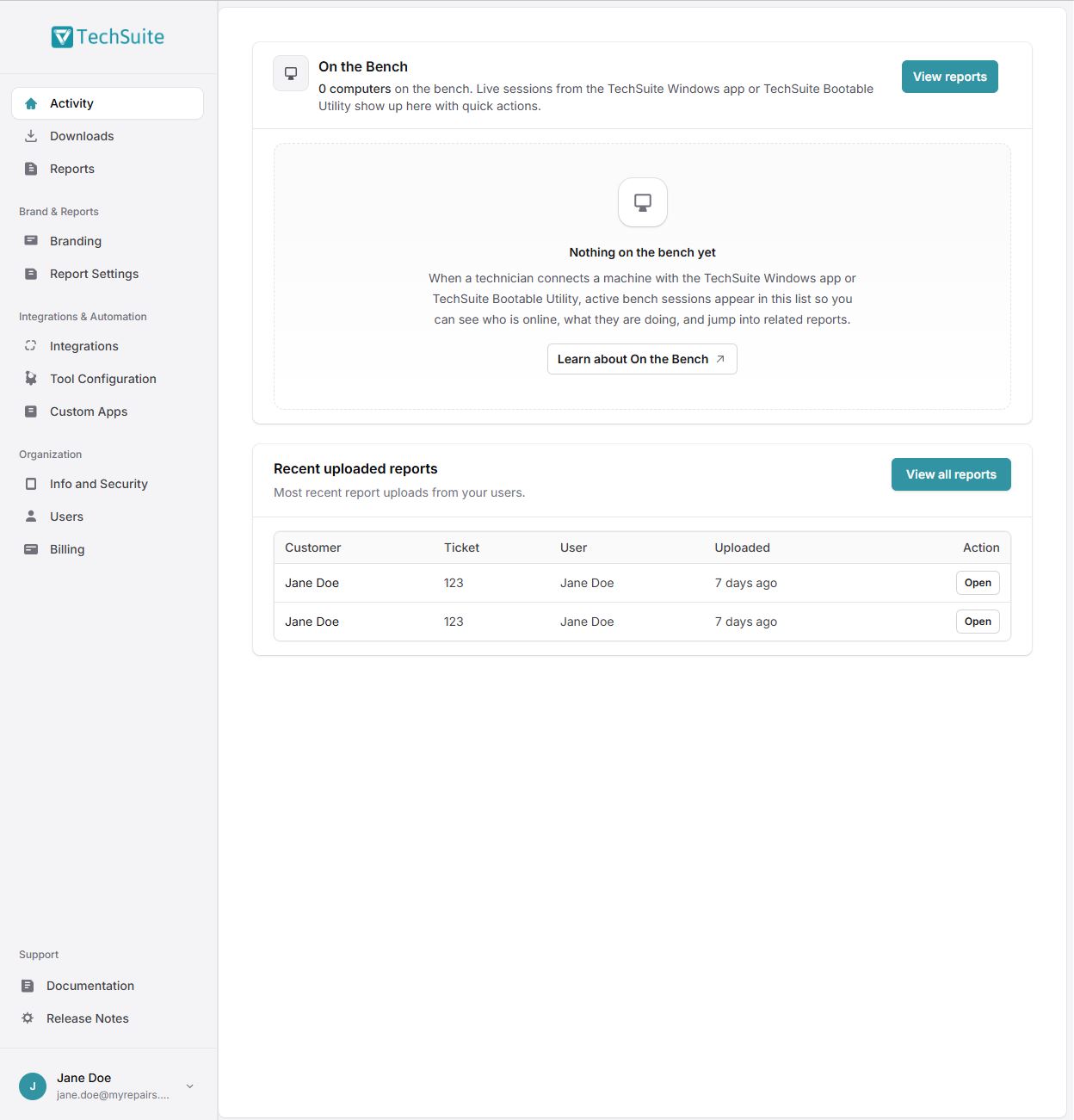
<?xml version="1.0" encoding="utf-8"?><feed xmlns="http://www.w3.org/2005/Atom" xml:lang="en_US"><generator uri="https://jekyllrb.com/" version="4.4.1">Jekyll</generator><link href="https://www.repairtechsolutions.com/feed.xml" rel="self" type="application/atom+xml" /><link href="https://www.repairtechsolutions.com/" rel="alternate" type="text/html" hreflang="en_US" /><updated>2026-09-22T10:43:50-07:00</updated><id>https://www.repairtechsolutions.com/feed.xml</id><title type="html">RepairTech</title><subtitle>Software for independent computer repair shops: TechSuite automates the work on your bench, and Lantern tells you when a customer&apos;s computer needs you again.</subtitle><entry><title type="html">New Integration: Malwarebytes Toolset (MBTS)</title><link href="https://www.repairtechsolutions.com/release-notes-malwarebytes-toolset-integration/" rel="alternate" type="text/html" title="New Integration: Malwarebytes Toolset (MBTS)" /><published>2026-08-27T14:35:56-07:00</published><updated>2026-08-27T14:35:56-07:00</updated><id>https://www.repairtechsolutions.com/release-notes-malwarebytes-toolset-integration</id><content type="html" xml:base="https://www.repairtechsolutions.com/release-notes-malwarebytes-toolset-integration/"><![CDATA[<p>Hey folks – If your shop has a Malwarebytes Techbench license, you can now run the Toolset (MBTS) straight from TechSuite. Upload your package once and it becomes a tool you can drop into any procedure, with results coming back on the report like anything else.</p><h2>🛡️ Connect it once</h2><p>Head to <strong>TechSuite Online Dashboard → Integrations → Malwarebytes Toolset</strong>. Upload your MBTS <code>.zip</code> (the one with <code>MBTSLauncher.exe</code> and its <code>Malwarebytes</code> folder), pick the scans you want, and hit Save. We&#8217;ll build it into a custom app for you — no command lines or dependency setup.</p><h2>📋 Reports, not raw output</h2><p>Two scans are wired up by default:</p><ul><li><strong>Asset Scan</strong> – a full inventory: hardware, storage, installed software, security posture and recent crashes</li><li><strong>Inform Scan</strong> – MBTS&#8217;s system report, covering the OS, hardware, programs, protection status, network and boot history</li></ul><p>Both are formatted on the report page, the same as our built-in tools.</p><h2>➕ Add the modes you actually use</h2><p>Those two are just a starting point. Edit them, or add any MBTS command-line mode your shop runs — threat scans, repairs, cleanup — and they&#8217;ll run as part of the procedure along with everything else.</p><p>One catch worth knowing up front: MBTS only writes a log file for <code>/scan:asset</code> and <code>/scan:inform</code>. Any other mode runs on the machine and finishes normally, but has nothing to hand back, so its stage on the report comes through empty. Those modes are for getting the work done as part of the job, not for showing you what it found.</p><h2>Good to know</h2><ul><li>You bring your own Techbench license — this connects the Toolset you already pay for.</li><li>The package is large (~250 MB) and counts toward your hosted file storage.</li><li>Integrations require a paid plan.</li></ul><p>Have feedback, or a scan you&#8217;d like supported? We&#8217;d love to hear from you.</p><p>Ian &amp; Garrett</p>]]></content><author><name></name></author><category term="integrations" /><category term="release-notes" /><summary type="html"><![CDATA[Hey folks – If your shop has a Malwarebytes Techbench license, you can now run the Toolset (MBTS) straight from…]]></summary><media:thumbnail xmlns:media="http://search.yahoo.com/mrss/" url="https://www.repairtechsolutions.com/assets/images/og-default.png" /><media:content medium="image" url="https://www.repairtechsolutions.com/assets/images/og-default.png" xmlns:media="http://search.yahoo.com/mrss/" /></entry><entry><title type="html">TechSuite 2.0 Beta – A Brand New Windows App UI</title><link href="https://www.repairtechsolutions.com/techsuite-2-0-beta-a-brand-new-windows-app-ui/" rel="alternate" type="text/html" title="TechSuite 2.0 Beta – A Brand New Windows App UI" /><published>2026-08-07T11:30:21-07:00</published><updated>2026-08-07T11:30:21-07:00</updated><id>https://www.repairtechsolutions.com/techsuite-2-0-beta-a-brand-new-windows-app-ui</id><content type="html" xml:base="https://www.repairtechsolutions.com/techsuite-2-0-beta-a-brand-new-windows-app-ui/"><![CDATA[<p>Hi folks – Back in April we redesigned the online dashboard and said that foundational work would let us move faster on bigger things. Here&#8217;s the biggest one so far: <strong>TechSuite 2.0, a complete rewrite of the Windows app&#8217;s</strong><br /><strong>interface.</strong></p><p>It&#8217;s available today as an opt-in Beta. You can download it from your Downloads page in the dashboard and try it whenever you like. Your existing TechSuite installs are not affected and will not auto-update to it.</p><p><strong>Everything Is New</strong></p><p>The Windows app&#8217;s UI hadn&#8217;t been meaningfully rethought in years. Every screen has been rebuilt from scratch &#8211; new layouts, new navigation, real typography, and consistent spacing throughout. The sidebar is now a clean icon rail (Home, Procedures, Tools, System, Reports, Settings) with a connection status indicator that tells you at a glance whether you&#8217;re online or working offline.</p><p>The customer, ticket, and technician fields now live in a persistent bar across the top of the app instead of being repeated on individual screens.</p><p><strong>Dark Mode</strong></p><p><a href="/wp-content/uploads/2026/08/darkmode.jpg"><img fetchpriority="high" decoding="async" src="/wp-content/uploads/2026/08/darkmode-1024x633.jpg" alt="" width="1024" height="633" srcset="/wp-content/uploads/2026/08/darkmode-1024x633.jpg 1024w, /wp-content/uploads/2026/08/darkmode-300x185.jpg 300w, /wp-content/uploads/2026/08/darkmode-768x475.jpg 768w, /wp-content/uploads/2026/08/darkmode.jpg 1157w" sizes="(max-width: 1024px) 100vw, 1024px" /></a></p><p>TechSuite now ships with a full light and dark theme. Flip it in Settings → General and the whole app recolors instantly. Your choice sticks between launches.</p><p><strong>A Real Home Screen</strong></p><p><a href="/wp-content/uploads/2026/08/overview.jpg"><img decoding="async" src="/wp-content/uploads/2026/08/overview-1024x630.jpg" alt="" width="1024" height="630" srcset="/wp-content/uploads/2026/08/overview-1024x630.jpg 1024w, /wp-content/uploads/2026/08/overview-300x185.jpg 300w, /wp-content/uploads/2026/08/overview-768x473.jpg 768w, /wp-content/uploads/2026/08/overview.jpg 1157w" sizes="(max-width: 1024px) 100vw, 1024px" /></a></p><p>Opening the app used to drop you into a wall of options. Home is now a landing screen built for the bench:</p><ul><li>Your shop&#8217;s logo and branding front and center &#8211; click it to open your site</li><li>This machine&#8217;s identity: name, current user, OS, and uptime</li><li>Instant vitals: CPU, installed memory, and per-drive space usage with color-coded warnings</li><li>Quick Run tiles for your pinned procedures, so your most-used work is one click from launch</li><li>Your three most recent reports, each openable directly</li></ul><p><strong>Tools and Procedures, Reorganized</strong></p><p><a href="/wp-content/uploads/2026/08/procedures.jpg"><img decoding="async" src="/wp-content/uploads/2026/08/procedures-1024x633.jpg" alt="" width="1024" height="633" srcset="/wp-content/uploads/2026/08/procedures-1024x633.jpg 1024w, /wp-content/uploads/2026/08/procedures-300x185.jpg 300w, /wp-content/uploads/2026/08/procedures-768x475.jpg 768w, /wp-content/uploads/2026/08/procedures.jpg 1155w" sizes="(max-width: 1024px) 100vw, 1024px" /></a></p><p>Both pages are now proper master-detail layouts: pick from the list on the left, see the full detail on the right. With 60+ tools that&#8217;s a dramatic improvement over hunting through a grid.</p><p>Tools now show their logos, supported operating systems, and available run modes. Procedures show their full ordered step list before you commit to running anything, and you can pin your favorites, &#8220;Favorite&#8221; procedures<br />become the Quick Run tiles on Home.</p><p>The procedure builder got the same treatment. Searching now looks across every category rather than just the one you have selected, and you get a details panel for each tool as you&#8217;re picking it, so you know what you&#8217;re adding.</p><p><strong>Runs You Can Walk Away From</strong></p><p><a href="/wp-content/uploads/2026/08/walkaway.jpg"><img loading="lazy" decoding="async" src="/wp-content/uploads/2026/08/walkaway-1024x638.jpg" alt="" width="1024" height="638" srcset="/wp-content/uploads/2026/08/walkaway-1024x638.jpg 1024w, /wp-content/uploads/2026/08/walkaway-300x187.jpg 300w, /wp-content/uploads/2026/08/walkaway-768x479.jpg 768w, /wp-content/uploads/2026/08/walkaway.jpg 1155w" sizes="(max-width: 1024px) 100vw, 1024px" /></a></p><p>This is one of our favorite changes. A running Procedure no longer holds the app hostage.</p><p>The run screen is now a live timeline &#8211; completed steps, the current tool, and what&#8217;s coming next, with a progress bar and single-line output. But you can navigate away from it mid-run. Go check System info, look at an old report, start building the next procedure. A banner across the top of the app follows you, showing live progress and exactly which tool is running, and clicking it takes you straight back. When the run finishes, that same banner turns into a link to the results.</p><p>Skip and Stop are still there. And the resume prompt (if TechSuite was interrupted mid-run) now counts itself down and continues automatically instead of waiting on you.</p><p><strong>Reports and System Info</strong></p><p><a href="/wp-content/uploads/2026/08/reports.jpg"><img loading="lazy" decoding="async" src="/wp-content/uploads/2026/08/reports-1024x636.jpg" alt="" width="1024" height="636" srcset="/wp-content/uploads/2026/08/reports-1024x636.jpg 1024w, /wp-content/uploads/2026/08/reports-300x186.jpg 300w, /wp-content/uploads/2026/08/reports-768x477.jpg 768w, /wp-content/uploads/2026/08/reports.jpg 1150w" sizes="(max-width: 1024px) 100vw, 1024px" /></a></p><p>The Reports page is now a full-width table grouped by day, with a View Report button on each row rather than a detail panel that mostly repeated what the table already showed.</p><p>The System page splits into OS, Hardware, Storage, Network, and Insights, with severity dots calling out anything that needs attention and a Generate Insights action to run a fresh analysis on demand.</p><p>While rebuilding this we also fixed a batch of long-standing system information bugs: memory now reports total installed RAM (previously it could show a single stick&#8217;s size on a multi-stick machine), the network adapter is properly identified instead of occasionally landing on a debug adapter, and several fields that were quietly failing to collect now populate correctly.</p><p><strong>Custom Apps and Offline Mode</strong></p><p><a href="/wp-content/uploads/2026/08/customapps.jpg"><img loading="lazy" decoding="async" src="/wp-content/uploads/2026/08/customapps-1024x633.jpg" alt="" width="1024" height="633" srcset="/wp-content/uploads/2026/08/customapps-1024x633.jpg 1024w, /wp-content/uploads/2026/08/customapps-300x185.jpg 300w, /wp-content/uploads/2026/08/customapps-768x474.jpg 768w, /wp-content/uploads/2026/08/customapps.jpg 1159w" sizes="(max-width: 1024px) 100vw, 1024px" /></a></p><p>The Add My App wizard is cleaner and now handles more: zip archives, progress feedback while saving, a clear message when a file is too large for upload, and it drops you on your new app when you&#8217;re done rather than leaving you to go find it.</p><p>The Offline tab is now an explicit flow: Click &#8220;Check&#8221;, get a plain summary of what&#8217;s present and what&#8217;s missing, then download only what you actually need. Since TechSuite is portable and often lives on a USB stick, checking on demand is both faster and more accurate than the old automatic scan.</p><p><strong>How to Get It</strong></p><p>Log into the dashboard and head to your Downloads page. You&#8217;ll see a TechSuite 2.0 row with a Beta badge &#8211; download it there, or copy the direct URL for your deployment tool.</p><p>To be clear about what Beta means here: this is a full rewrite of the interface, and while we&#8217;ve been testing it hard, we&#8217;re sure there are rough edges we haven&#8217;t hit yet. Your existing TechSuite installs will keep working exactly as they do today and won&#8217;t be pulled onto 2.0 until we publidsh it for real.</p><p>We would genuinely love your feedback on this one. Email us at support@repairtechsolutions.com and tell us what feels better, what feels worse, and what&#8217;s broken.</p><p>Ian &amp; Garrett</p>]]></content><author><name></name></author><category term="general" /><category term="release-notes" /><summary type="html"><![CDATA[Hi folks – Back in April we redesigned the online dashboard and said that foundational work would let us move…]]></summary><media:thumbnail xmlns:media="http://search.yahoo.com/mrss/" url="https://www.repairtechsolutions.com/assets/images/og-default.png" /><media:content medium="image" url="https://www.repairtechsolutions.com/assets/images/og-default.png" xmlns:media="http://search.yahoo.com/mrss/" /></entry><entry><title type="html">Release Notes – TechSuite Windows App 1.2.1: PowerShell support for Custom Apps</title><link href="https://www.repairtechsolutions.com/release-notes-techsuite-windows-app-1-2-1-powershell-support-for-custom-apps/" rel="alternate" type="text/html" title="Release Notes – TechSuite Windows App 1.2.1: PowerShell support for Custom Apps" /><published>2026-07-13T12:12:32-07:00</published><updated>2026-07-13T12:12:32-07:00</updated><id>https://www.repairtechsolutions.com/release-notes-techsuite-windows-app-1-2-1-powershell-support-for-custom-apps</id><content type="html" xml:base="https://www.repairtechsolutions.com/release-notes-techsuite-windows-app-1-2-1-powershell-support-for-custom-apps/"><![CDATA[<p>Hey folks &#8211; We&#8217;ve just released TechSuite Windows App 1.2.1, which now supports .ps1 files in Custom Apps. Previously, it only supported .bat and .exe files, but now it can run PowerShell scripts as well.</p><p><strong>What&#8217;s Next:</strong></p><p>We&#8217;re working on expanding what you can do from the Online Dashboard. Here&#8217;s what&#8217;s coming soon:</p><ul><li>Ability to create/edit Procedures from the Online Dashboard</li><li>Ability to create/edit Custom Apps from the Online Dashboard</li></ul><p><strong>Have any feature requests? We&#8217;d love to hear them! Email us at <a href="mailto:support@repairtechsolutions.com">support@repairtechsolutions.com</a></strong></p>]]></content><author><name></name></author><category term="general" /><category term="release-notes" /><summary type="html"><![CDATA[Hey folks – We’ve just released TechSuite Windows App 1.2.1, which now supports .ps1 files in Custom Apps. Previously, it…]]></summary><media:thumbnail xmlns:media="http://search.yahoo.com/mrss/" url="https://www.repairtechsolutions.com/assets/images/og-default.png" /><media:content medium="image" url="https://www.repairtechsolutions.com/assets/images/og-default.png" xmlns:media="http://search.yahoo.com/mrss/" /></entry><entry><title type="html">Release Notes – “Get Product Keys” Tool Fixes</title><link href="https://www.repairtechsolutions.com/release-notes-get-product-keys-tool-fixes/" rel="alternate" type="text/html" title="Release Notes – “Get Product Keys” Tool Fixes" /><published>2026-05-12T09:30:12-07:00</published><updated>2026-05-12T09:30:12-07:00</updated><id>https://www.repairtechsolutions.com/release-notes-get-product-keys-tool-fixes</id><content type="html" xml:base="https://www.repairtechsolutions.com/release-notes-get-product-keys-tool-fixes/"><![CDATA[<p>Hi folks – small but important update today on the Get Product Keys tool, plus a quick note on some behind-the-scenes plumbing on our end.</p><p><strong>Get Product Keys: actual keys show up again</strong></p><p>A recent update to the Get Product Keys tool started rendering product and edition names where the key strings were supposed to go.</p><p>So if you ran it on a customer machine over the last couple weeks, you&#8217;d see a green banner correctly saying something like &#8220;Found 4 product keys (2 partial)&#8221; — but the Key / Serial column was filled with edition labels like <code>Office 16, Office16O365HomePremR_Grace edition</code>, and the dedicated Windows and Office sections never appeared at all. The real keys (and the recoverable partial keys for Office 2013 and later) were being collected fine. They just weren&#8217;t making it onto the report page.</p><p>That&#8217;s fixed. The report now renders properly:</p><ul><li>A dedicated <strong>Windows</strong> section with the full product key in mono, license-type badges (OEM / Retail / Volume), activation status, and a note on whether the key is transferable to new hardware.</li><li>A <strong>Microsoft Office</strong> section with each detected license on its own card — subscription accounts, retail keys, partial keys from Office 2013+, and grace-period entries are separated and labeled distinctly.</li><li>An <strong>Other Software</strong> table covering SQL Server, Exchange, Visual Studio, VMware, Adobe, Corel, Autodesk, and Acronis.</li></ul><p>If you&#8217;ve got reports from the last couple weeks where only edition names showed up in the key column, just re-run the tool — the data was always there, only the rendering was wrong.</p>]]></content><author><name></name></author><category term="general" /><category term="release-notes" /><summary type="html"><![CDATA[Hi folks – small but important update today on the Get Product Keys tool, plus a quick note on some…]]></summary><media:thumbnail xmlns:media="http://search.yahoo.com/mrss/" url="https://www.repairtechsolutions.com/assets/images/og-default.png" /><media:content medium="image" url="https://www.repairtechsolutions.com/assets/images/og-default.png" xmlns:media="http://search.yahoo.com/mrss/" /></entry><entry><title type="html">Release Notes – TechSuite Windows App 1.2.0: One Build for UI and Command Line</title><link href="https://www.repairtechsolutions.com/release-notes-techsuite-windows-app-1-2-0-one-build-for-ui-and-command-line/" rel="alternate" type="text/html" title="Release Notes – TechSuite Windows App 1.2.0: One Build for UI and Command Line" /><published>2026-05-04T13:29:10-07:00</published><updated>2026-05-04T13:29:10-07:00</updated><id>https://www.repairtechsolutions.com/release-notes-techsuite-windows-app-1-2-0-one-build-for-ui-and-command-line</id><content type="html" xml:base="https://www.repairtechsolutions.com/release-notes-techsuite-windows-app-1-2-0-one-build-for-ui-and-command-line/"><![CDATA[<p>Hi folks – Today&#8217;s update is mostly about getting our Windows app&#8217;s plumbing right, with a small sidebar refresh on top.</p><p>For a long time we&#8217;ve shipped two separate builds of TechSuite for Windows: the regular desktop app and a separate &#8220;console&#8221; build for technicians who run TechSuite from cmd, PowerShell, or their RMM. As of 1.2.0 those two are the same download. Same .exe, same install path, just smarter about what it does depending on how you launch it.</p><p><strong>One Executable, Both Modes</strong></p><p>Run <code>TechSuite.exe</code> with no arguments and you get the desktop app exactly like before. Run it from a terminal with arguments — <code>--account</code>, <code>--run --procedure cleanup</code>, <code>--download --tool malware-scanner</code>, etc. — and the output now goes straight to the calling terminal window instead of a separate popup. cmd, PowerShell, and most RMM scripting modules will all just work. There&#8217;s nothing to configure.</p><p>For setups that launch TechSuite without a parent console (a hidden RMM job, a scheduled task), we&#8217;ve added a new optional flag: <code>--force-console-window</code>. Pass it alongside your other arguments and TechSuite will open its own console window so you can see what&#8217;s happening. Skip it and TechSuite stays quiet, which is what most automation wants anyway.</p><p><strong>Proper Exit Codes</strong></p><p>CLI runs now return real exit codes — <code>0</code> on success, non-zero on failure (parse errors, invalid arguments, password prompts, command failures). If you have RMM or PowerShell scripts that previously assumed TechSuite always exited cleanly, double-check them. Some failures that used to slip past as &#8220;success&#8221; will now show up as the errors they actually were. This is the correct behavior, but it&#8217;s worth a quick look if you&#8217;ve automated around the old quirk.</p><p><strong>Sidebar Refresh</strong></p><p>We tightened up the left navigation in the desktop app:</p><ul><li>The buttons (Procedures, Tools, Reports, System, Online, Settings) now match the panel color exactly, instead of the slight two-tone that was there before.</li><li>The currently-selected page is shown by tinting that tile a darker shade — the small chevron indicator is gone.</li><li>Tiles are slightly taller with more breathing room around the icon and label.</li></ul><p>Nothing functional changed; navigation works the same way it always has. It just looks a bit cleaner.</p><p><strong>Help Page Cleanup</strong></p><p>In Settings → Help, we removed the &#8220;Submit a ticket&#8221; link (we have better support flows now), and the Release Notes section is now a &#8220;View Release Notes&#8221; button that opens this page directly, instead of a static blob of text inside the app. Easier for us to keep current.</p><p><strong>Stability</strong></p><p>Resolved a rare condition where, if TechSuite ever failed to write to its debug log on disk, it could get stuck retrying the write. Disk-write failures are now reported once and quietly skipped for the rest of the session, so a wedged debug file can&#8217;t cascade into anything bigger.</p>]]></content><author><name></name></author><category term="general" /><category term="release-notes" /><summary type="html"><![CDATA[Hi folks – Today’s update is mostly about getting our Windows app’s plumbing right, with a small sidebar refresh on…]]></summary><media:thumbnail xmlns:media="http://search.yahoo.com/mrss/" url="https://www.repairtechsolutions.com/assets/images/og-default.png" /><media:content medium="image" url="https://www.repairtechsolutions.com/assets/images/og-default.png" xmlns:media="http://search.yahoo.com/mrss/" /></entry><entry><title type="html">The TechSuite Dashboard Has Been Redesigned</title><link href="https://www.repairtechsolutions.com/the-techsuite-dashboard-has-been-redesigned/" rel="alternate" type="text/html" title="The TechSuite Dashboard Has Been Redesigned" /><published>2026-04-13T16:12:44-07:00</published><updated>2026-04-13T16:12:44-07:00</updated><id>https://www.repairtechsolutions.com/the-techsuite-dashboard-has-been-redesigned</id><content type="html" xml:base="https://www.repairtechsolutions.com/the-techsuite-dashboard-has-been-redesigned/"><![CDATA[<p>Hi folks – Last week we wrote about a major infrastructure upgrade we completed under the hood. We said at the time that it was a prerequisite for bigger things. This is the first of those things&#8230;</p><p>Tomorrow we&#8217;re launching a completely redesigned TechSuite online dashboard.</p><p><strong>Modern Design, Mobile Compatible</strong></p><p>The dashboard has been rebuilt from the ground up with a modern look and feel. It&#8217;s also now fully mobile compatible, so it works properly on phones and tablets. Everything that existed before is still there — it&#8217;s just cleaner, better organized, and easier to navigate. Here&#8217;s what it looks like on mobile now:</p><p><a href="/wp-content/uploads/2026/04/mobile.jpg"><img loading="lazy" decoding="async" src="/wp-content/uploads/2026/04/mobile.jpg" alt="" width="431" height="935" /></a></p><p><strong>Significantly Faster</strong></p><p>The redesign takes advantage of modern Rails features that allow pages to update without full reloads. The dashboard should feel noticeably faster across the board.</p><p><strong>Overhauled Custom Branding</strong></p><p>Custom branding has been simplified considerably. Instead of manually entering multiple hex color values, you now pick a single accent color and it&#8217;s applied consistently throughout the dashboard. Custom logos still work exactly as before.</p><p><strong>Settings, Reorganized</strong></p><p>The old Settings page crammed everything into a series of tabs — report settings, integrations, tool configuration, custom apps, billing, users, and more. Each of these is now its own dedicated page, which should make it much faster to find what you&#8217;re looking for.</p><p><a href="/wp-content/uploads/2026/04/settings.jpg"><img loading="lazy" decoding="async" src="/wp-content/uploads/2026/04/settings.jpg" alt="" width="253" height="697" /></a></p><p>As part of this, Report Settings now has a dedicated section for customizing report layouts — a feature that was previously buried and most users never found.</p><p>We&#8217;ve also split out a separate Profile page for your individual user information, so personal settings are no longer mixed in with organization-wide settings.</p><p><strong>On-Demand Invoices</strong></p><p>You can now view and download invoices directly from the dashboard by clicking &#8220;View Invoice.&#8221; Previously this required emailing us to request one — something a lot of you did. No more.</p><p><a href="/wp-content/uploads/2026/04/invoices.jpg"><img loading="lazy" decoding="async" src="/wp-content/uploads/2026/04/invoices.jpg" alt="" width="934" height="255" /></a></p><p><strong>On The Bench — Live Updates</strong></p><p>On The Bench now updates in real time. You can watch jobs progress without refreshing the screen at all.</p><p><a href="/wp-content/uploads/2026/04/activity.jpg"><img loading="lazy" decoding="async" src="/wp-content/uploads/2026/04/activity-982x1024.jpg" alt="" width="982" height="1024" /></a></p><p><strong>What&#8217;s Next</strong></p><p>Now that the foundation is in place, we can add new features to the dashboard much more easily than before. We have a list of things we want to build — and we&#8217;d love to hear what you want to see.</p><p>The redesign will go live tomorrow for all users. There are no known issues at launch, but if you run into anything at all, just reply to this email and we&#8217;ll get it sorted.</p><p>Ian &amp; Garrett</p>]]></content><author><name></name></author><category term="general" /><category term="release-notes" /><summary type="html"><![CDATA[Hi folks – Last week we wrote about a major infrastructure upgrade we completed under the hood. We said at…]]></summary><media:thumbnail xmlns:media="http://search.yahoo.com/mrss/" url="https://www.repairtechsolutions.com/assets/images/og-default.png" /><media:content medium="image" url="https://www.repairtechsolutions.com/assets/images/og-default.png" xmlns:media="http://search.yahoo.com/mrss/" /></entry><entry><title type="html">Under the Hood – Major Infrastructure Upgrade Complete</title><link href="https://www.repairtechsolutions.com/under-the-hood-major-infrastructure-upgrade-complete/" rel="alternate" type="text/html" title="Under the Hood – Major Infrastructure Upgrade Complete" /><published>2026-04-06T14:01:00-07:00</published><updated>2026-04-06T14:01:00-07:00</updated><id>https://www.repairtechsolutions.com/under-the-hood-major-infrastructure-upgrade-complete</id><content type="html" xml:base="https://www.repairtechsolutions.com/under-the-hood-major-infrastructure-upgrade-complete/"><![CDATA[<p>Hi folks – This one is less about new features and more about a significant amount of work we did behind the scenes. Over the past several weeks we completed a major version upgrade to the Ruby on Rails framework that powers the TechSuite online dashboard. If everything went well, you noticed nothing — and that was the goal.</p><p><strong>Security</strong></p><p>By moving to the latest version of Rails, we were able to upgrade all of our underlying libraries and close every known vulnerability in the stack. Our security audits are now clean across the board. This was long overdue and we&#8217;re glad it&#8217;s done.</p><p><strong>Performance</strong></p><p>We also picked up real performance improvements — both from the Rails upgrade itself and from moving to a significantly faster version of Ruby underneath it. Pages and reports should feel snappier, and the app handles load more efficiently.</p><p><strong>Test Coverage</strong></p><p>As part of this upgrade we dramatically expanded our automated test coverage. This pays dividends in two ways: we can now stay current with security updates without falling behind, and we&#8217;ll ship fewer bugs going forward. More of the app is verified automatically before anything reaches you.</p><p><strong>Bug Fixes</strong></p><p>A handful of bugs that had been around for a while are now resolved — including some issues with report counts, form validation, navigation highlighting, and installer code signing reliability.</p><p><strong>What&#8217;s Next</strong></p><p>This upgrade was a prerequisite for work we&#8217;ve been wanting to do on the dashboard for a while — a refreshed UI, additional features, modernized report layouts, and more. We wanted to get the foundation right before building on top of it, and now we can.</p><p>As always, if you notice anything unexpected, email us at <a href="mailto:support@repairtechsolutions.com">support@repairtechsolutions.com</a>.</p><p>Ian &amp; Garrett</p>]]></content><author><name></name></author><category term="general" /><category term="release-notes" /><summary type="html"><![CDATA[Hi folks – This one is less about new features and more about a significant amount of work we did…]]></summary><media:thumbnail xmlns:media="http://search.yahoo.com/mrss/" url="https://www.repairtechsolutions.com/assets/images/og-default.png" /><media:content medium="image" url="https://www.repairtechsolutions.com/assets/images/og-default.png" xmlns:media="http://search.yahoo.com/mrss/" /></entry><entry><title type="html">Release Notes – 5 More Tools Rewritten, New Network &amp;amp; Diagnostic Tools, and Bug Fixes</title><link href="https://www.repairtechsolutions.com/release-notes-5-more-tools-rewritten-new-network-diagnostic-tools-and-bug-fixes/" rel="alternate" type="text/html" title="Release Notes – 5 More Tools Rewritten, New Network &amp;amp; Diagnostic Tools, and Bug Fixes" /><published>2026-03-26T13:10:18-07:00</published><updated>2026-03-26T13:10:18-07:00</updated><id>https://www.repairtechsolutions.com/release-notes-5-more-tools-rewritten-new-network-diagnostic-tools-and-bug-fixes</id><content type="html" xml:base="https://www.repairtechsolutions.com/release-notes-5-more-tools-rewritten-new-network-diagnostic-tools-and-bug-fixes/"><![CDATA[<p>Hi folks – Big update today. We&#8217;ve rewritten five more  tools from the ground up with much better analysis and reporting, shipped two brand new tools, completely overhauled all of the network tools, added multi-integration support to the Online Dashboard, and pushed bug fixes to nearly everything we released earlier this month.</p><p><strong>Check for Blue Screens — Complete Rewrite</strong></p><p>The old version just listed crash dump files with some basic metadata. The new version actually diagnoses the problem.</p><p>It reads the crash dump files, identifies the specific driver or module that caused the crash, and categorizes the root cause — driver issue, bad memory, failing disk, hardware problem, or OS corruption. Instead of handing you raw data and leaving you to figure it out, it now gives you a specific repair recommendation.</p><p>The standout feature is a built-in database of 80+ known problematic drivers. If a machine is crashing because of a driver we&#8217;ve seen cause problems before, the report calls it out immediately. It also checks whether any recent Windows Updates correlate with when the crashes started — useful for those &#8220;it started crashing after an update&#8221; situations. We also fixed an issue where crash dumps stored in a non-default location weren&#8217;t being found.</p><ul><li>Identifies the faulting driver/module and tells you the likely root cause</li><li>Flags known problematic drivers automatically</li><li>Detects crash frequency trends — tells you if a machine is getting worse</li><li>Correlates crashes with recent Windows Updates</li><li>Gives you actionable repair recommendations instead of raw dump data</li></ul><p><strong>Get Product Keys — Complete Rewrite</strong></p><p>The old version showed you Windows and Office product keys — and that was about it. The new version is a much more complete key recovery tool.</p><p>The biggest improvement: it now recovers the BIOS/UEFI embedded Windows key, which is the most reliable source on modern PCs. On many Windows 11 machines, the old tool would come back empty because the registry key is blank — the new version finds the key burned into firmware instead. It also tells you the license type (OEM, Retail, Volume, or Digital License) so you know whether a key will survive a hardware swap, and reports activation status.</p><p>It now detects Office 365 subscriptions and tells you &#8220;no key needed — sign in with Microsoft account&#8221; instead of showing confusing placeholder keys. Generic keys (like Windows upgrade keys or KMS client keys) are flagged so you don&#8217;t waste time with keys that aren&#8217;t real licenses. And it scans for third-party product keys too — VMware, Adobe Acrobat, CorelDRAW, AutoCAD, and Acronis — things customers commonly need recovered before a reinstall.</p><ul><li>Recovers BIOS/UEFI embedded Windows keys — works on Win11 where the old tool often came up empty</li><li>Shows license type (OEM/Retail/Volume/Digital) so you know if it transfers to new hardware</li><li>Reports activation status</li><li>Flags placeholder and generic keys</li><li>Detects Office 365 subscriptions — &#8220;no key, just sign in&#8221;</li><li>Scans for VMware, Adobe, Corel, AutoCAD, and Acronis product keys</li></ul><p><strong>List Startup Applications — Complete Rewrite</strong></p><p>The old version listed startup entries from the basic registry Run keys and startup folders. The new version goes much deeper and turns this into a startup triage tool.</p><p>It now scans advanced persistence locations that the old version missed entirely — AppInit_DLLs, Winlogon hooks, Image File Execution Options (a common malware trick to hijack executables), shell overrides, Browser Helper Objects, and scheduled tasks with logon triggers. For each entry, it checks digital signatures and flags anything running from suspicious locations like TEMP, Downloads, or the Recycle Bin.</p><p>If you&#8217;re doing a malware removal and want to quickly see what&#8217;s set to auto-start and whether any of it looks suspicious, this tool now gives you that picture.</p><ul><li>Scans registry Run keys, startup folders, plus advanced persistence locations malware commonly uses</li><li>Checks AppInit_DLLs, Winlogon, Image File Execution Options, shell overrides, BHOs, and scheduled tasks</li><li>Verifies digital signatures on startup executables</li><li>Flags entries running from suspicious locations (TEMP, Downloads, Recycle Bin, AppData)</li><li>Shows enabled/disabled state for each entry</li></ul><p><strong>Check for App Crashes — Complete Rewrite</strong></p><p>The old version dumped a table of crash records with no analysis. The new version reads the same Windows Error Reporting data but actually interprets it.</p><p>It now scores system stability (Good, Fair, Poor, or Critical), detects repeated crashers, identifies when a crash pattern started (&#8220;crash-free for 45 days, then started crashing 3 days ago&#8221;), and analyzes fault modules across multiple apps. If the same module is crashing in three different applications, the report flags it as a system-level issue rather than an app problem. It also detects hardware-related patterns — like heap corruption across multiple apps, which often points to bad RAM.</p><ul><li>Stability scoring: Good / Fair / Poor / Critical</li><li>Detects repeated crashers and crash frequency trends</li><li>Onset detection — tells you when the problems started</li><li>Cross-app pattern detection — flags system-level issues vs. single-app problems</li><li>Hardware pattern detection — heap corruption across apps suggests bad RAM</li><li>Prioritized repair recommendations (high/medium/low)</li><li>Covers crashes, hangs, and UWP app crashes</li></ul><p><strong>Check Battery Health — Complete Rewrite</strong></p><p>The old version showed raw battery numbers with no interpretation. The new version gives you an actual diagnosis.</p><p>Instead of showing milliwatt-hour numbers and leaving you to do the math, it now computes battery health as a percentage, estimates remaining runtime, reports cycle count on supported hardware, checks the active power plan, and looks at power-related Windows Event Log entries. If a battery is degraded, it tells you directly whether it needs replacement.</p><p>It also handles desktops and VMs gracefully — if there&#8217;s no battery, it skips the checks instead of erroring out.</p><ul><li>Battery health percentage with degradation assessment</li><li>Clear replacement recommendations when batteries are worn</li><li>Cycle count reporting (Win10+)</li><li>Estimated runtime calculation</li><li>Power plan detection</li><li>Handles desktops and VMs gracefully — no more errors on machines without batteries</li></ul><p><strong>List Windows Services — New Tool</strong></p><p>This is a brand new diagnostic tool. It checks 20 critical Windows services to make sure they&#8217;re in the state they should be, detects installed antivirus products (including leftover remnants from incomplete uninstalls), and flags anything suspicious — services running from unusual locations, services with missing executables, and services that are stuck or unexpectedly stopped.</p><p>If you&#8217;ve ever had a customer with a half-uninstalled antivirus causing conflicts, or a machine where Windows Update wasn&#8217;t working because a critical service was disabled, this tool catches that. It&#8217;s been added to the Basic Diagnostics and Malware Removal procedures.</p><ul><li>Checks 20 critical Windows services against their expected states</li><li>Detects installed antivirus products and leftover remnants from incomplete uninstalls</li><li>Flags suspicious services running from unusual locations or with missing executables</li><li>Identifies OEM bloatware and telemetry services</li><li>Catches hung or unexpectedly stopped services</li></ul><p><strong>Network Tools — Complete Overhaul</strong></p><p>We rebuilt the entire network tool stack from the ground up. Every existing network tool has been updated, we&#8217;ve added four new ones, and updated the Fix Internet Issues procedure to tie them all together.</p><p><em>What&#8217;s new:</em></p><p><strong>Network Diagnostics</strong> runs a 10-point health check covering adapters, DNS, gateway, internet connectivity, WiFi signal strength, proxy settings, and active connections. Run this first to get a clear picture of what&#8217;s actually broken before you start fixing things.</p><p><strong>Reset Network Adapter</strong> disables and re-enables physical network adapters to clear hung connections — the &#8220;turn it off and on again&#8221; approach, but it only touches physical adapters and picks the right one.</p><p><strong>Reset Proxy Settings</strong> clears proxy configurations and detects malware-injected proxies. We added this to the Malware Removal procedure since malware commonly redirects traffic through rogue proxies.</p><p><strong>Repair DNS</strong> restarts the DNS Client service, flushes the cache, and resets DNS configuration. Also added to the Malware Removal procedure.</p><p><em>Updated existing tools:</em></p><p>Reset Internet Protocol, Repair Winsock, Renew Internet Connections, Flush DNS Resolver Cache, Reset Windows Firewall Configuration, Restore Default HOSTS File, and Sync System Time have all been rebuilt with better reporting. We also fixed several issues — the tools now correctly handle &#8220;restart required&#8221; results instead of reporting them as failures, and adapter selection is smarter about picking the right network adapter.</p><p><em>Retired tools:</em></p><p>We&#8217;ve removed Repair Windows Automatic Updates, Repair SSL/HTTPS/Cryptography, and Repair Workgroup Computers View — these were outdated and no longer relevant.</p><p><em>Updated &#8220;Fix Internet Issues&#8221; Procedure:</em></p><p>We&#8217;ve updated the <strong>Fix Internet Issues</strong> procedure to include the new network tools. It runs them in the right order: diagnose first, then work through DNS, proxy, HOSTS file, connections, adapter, firewall, IP stack, Winsock, and time sync.</p><p><strong>TechSuite Online Dashboard — Multiple Integrations at the Same Time</strong></p><p>Previously, you could only have one integration active at a time — so if you were using Syncro, you couldn&#8217;t also use webhooks to send notifications to Slack or Discord. That limitation is gone. You can now have a CRM/PSA integration (Syncro, RepairShopr, ConnectWise, Autotask, CommitCRM, mHelpdesk, or PC Repair Tracker) and webhooks running simultaneously. Just enable both from the Integrations tab in TechPortal — no need to choose one or the other.</p><p><strong>Bug Fixes to Previously Released Tools</strong></p><p>We&#8217;ve been actively fixing issues found in the field across the tools we shipped earlier this month.</p><p><strong>Windows Defender</strong> — Fixed an issue where Full Scan mode would hang and never produce results. Scans now complete and report reliably.</p><p><strong>Clean Windows Update Cache</strong> — Two rounds of fixes addressing exit code handling, the catroot2 cleanup incorrectly masking earlier failures, and four additional issues found by reviewing production logs.</p><p><strong>Test HDD for Issues</strong> — Fixed a parser compatibility issue that could cause report generation to fail.</p><p><strong>Check Device Manager</strong> — Added proper parsed report output (previously the raw output was shown directly).</p><p><strong>Create Restore Point</strong> — Fixed a 70% failure rate on certain machines. The tool was reporting failure even when the restore point was actually created successfully. Added fallback verification, fixed several edge cases with System Restore detection, and improved the report output.</p><p><strong>Fix Filesystem Issues</strong> — Fixed several issues: check-only mode was accidentally running repairs (SFC and chkdsk), DISM was incorrectly reporting success when it was skipped, CBS log analysis was hardcoded to the C: drive, and SFC output was garbled on Windows 10/11.</p><p><strong>Install Windows Updates</strong> — Fixed the tool blocking entirely when a background Windows Update process was already running (now waits and warns instead). Fixed false positive &#8220;reboot pending&#8221; warnings and category filter matching issues.</p><p>As always, if you have requests or notice anything unexpected, just send us an email at <a href="mailto:support@repairtechsolutions.com" target="_blank" rel="noopener noreferrer">support@repairtechsolutions.com</a>.</p><p>Ian &amp; Garrett</p>]]></content><author><name></name></author><category term="general" /><category term="release-notes" /><summary type="html"><![CDATA[Hi folks – Big update today. We’ve rewritten five more  tools from the ground up with much better analysis and…]]></summary><media:thumbnail xmlns:media="http://search.yahoo.com/mrss/" url="https://www.repairtechsolutions.com/assets/images/og-default.png" /><media:content medium="image" url="https://www.repairtechsolutions.com/assets/images/og-default.png" xmlns:media="http://search.yahoo.com/mrss/" /></entry><entry><title type="html">Release Notes – Windows Defender Released and ProcessHawk, HJT Revamped</title><link href="https://www.repairtechsolutions.com/release-notes-windows-defender-released-and-processhawk-hjt-revamped/" rel="alternate" type="text/html" title="Release Notes – Windows Defender Released and ProcessHawk, HJT Revamped" /><published>2026-03-24T13:09:54-07:00</published><updated>2026-03-24T13:09:54-07:00</updated><id>https://www.repairtechsolutions.com/release-notes-windows-defender-released-and-processhawk-hjt-revamped</id><content type="html" xml:base="https://www.repairtechsolutions.com/release-notes-windows-defender-released-and-processhawk-hjt-revamped/"><![CDATA[<p>Hi folks – We&#8217;ve got a batch of updates to share. ProcessHawk has been completely rewritten, we&#8217;ve shipped a brand new Windows Defender tool, and HijackThis has been modernized with an actively maintained replacement under the hood. Details below.</p><p><strong>ProcessHawk — Complete Rewrite</strong></p><p>The old version dated back to 2016 — no error handling, no real report output, and a whitelist that hadn&#8217;t been touched in seven years. The new version does what it always did (kills unnecessary processes before malware scans), but now gives you a real picture of what was running on the machine and whether any of it looks suspicious.</p><p>The biggest addition is suspicious process intelligence. ProcessHawk now flags processes running from locations commonly associated with malware — TEMP folders, Downloads, AppData, the Recycle Bin — and highlights unsigned executables. If a process resists termination, it gets called out prominently in the report. The goal is to give you an instant read on whether a machine is likely infected before the scan even starts.</p><ul><li>Suspicious location flagging (TEMP, Downloads, AppData, Recycle Bin) with per-process badges in the report</li><li>Unsigned process detection — killed processes without a digital signature are highlighted</li><li>Failed-to-kill processes are called out as potential active malware</li><li>Hardcoded critical process protection — csrss, lsass, svchost, explorer, and other system processes can never be killed, even if the whitelist is misconfigured</li><li>Completely updated whitelist with modern RMM tools (AnyDesk, NinjaRMM, Datto, Syncro, ConnectWise), Windows Defender components, Windows Terminal, and dozens of other modern system processes</li><li>New Dry Run mode lets you see exactly what ProcessHawk would kill without actually terminating anything — useful for verifying whitelist coverage on a new machine</li><li>Full parsed report with stats, alerts, and a process table replacing the old raw text dump</li></ul><p><strong>Windows Defender — New Tool</strong></p><p>Windows Defender is a brand new tool that gives you a complete picture of a machine&#8217;s security posture without opening a dozen different windows. Run Diagnostic mode and you get Defender&#8217;s protection status, signature age, threat inventory, exclusion audit, competing AV detection, Windows Firewall status, and a security health score — all in one report.</p><p>The tool flags the things that actually matter: signatures that haven&#8217;t updated in weeks, suspicious exclusions that malware may have added, third-party AV products conflicting with Defender, and ransomware protection (Controlled Folder Access) being disabled. Quick Scan and Full Scan modes let you kick off a Defender scan directly from TechSuite, and Update Signatures pulls fresh definitions without navigating Windows Security.</p><ul><li>Diagnostic mode with full security posture report and health score</li><li>Signature age warnings and threat inventory</li><li>Exclusion audit — flags entries that look like malware-added exceptions</li><li>Competing AV detection and conflict reporting</li><li>Controlled Folder Access (ransomware protection) status</li><li>Windows Firewall status per network profile</li><li>Quick Scan, Full Scan, and Update Signatures modes</li><li>Requires Windows 10 or later</li></ul><p><strong>HijackThis — Modernized with HiJackThis+</strong></p><p>The old version wrapped the original TrendMicro HiJackThis v2.0.5, which hasn&#8217;t been updated since 2013 and doesn&#8217;t work properly on Windows 10 or 11. The new version uses HiJackThis+ by Dragokas — an actively maintained fork that supports Windows 7 through 11 and adds detection categories that didn&#8217;t exist when the original was abandoned.</p><p>The wrapper itself is also brand new. Instead of just launching the executable and dumping raw output, the tool now parses the full scan log, categorizes every entry, and produces a structured report with clear sections for startup items, services, scheduled tasks, browser settings, and more.</p><ul><li>Upgraded from TrendMicro HiJackThis v2.0.5 (2013) to HiJackThis+ v3.4.0.17 (2025)</li><li>Full Windows 10 and 11 support — the old version would frequently fail or produce incomplete scans on modern systems</li><li>New parsed report with collapsible sections for startup items, services, scheduled tasks, hosts file entries, and more</li><li>Services with missing executables are flagged with clear visual indicators</li><li>Structured output with entry counts by category, service counts, and scan duration</li><li>Admin check, VM detection, and OS version reporting in diagnostics</li></ul><p>As always, if you have requests or notice anything unexpected, just send us an email at <a href="mailto:support@repairtechsolutions.com">support@repairtechsolutions.com</a>.</p><p>Ian &amp; Garrett</p>]]></content><author><name></name></author><category term="general" /><category term="release-notes" /><summary type="html"><![CDATA[Hi folks – We’ve got a batch of updates to share. ProcessHawk has been completely rewritten, we’ve shipped a brand…]]></summary><media:thumbnail xmlns:media="http://search.yahoo.com/mrss/" url="https://www.repairtechsolutions.com/assets/images/og-default.png" /><media:content medium="image" url="https://www.repairtechsolutions.com/assets/images/og-default.png" xmlns:media="http://search.yahoo.com/mrss/" /></entry><entry><title type="html">Release Notes – 2 More Tools Completely Rewritten</title><link href="https://www.repairtechsolutions.com/release-notes-2-more-tools-completely-rewritten/" rel="alternate" type="text/html" title="Release Notes – 2 More Tools Completely Rewritten" /><published>2026-03-23T11:14:40-07:00</published><updated>2026-03-23T11:14:40-07:00</updated><id>https://www.repairtechsolutions.com/release-notes-2-more-tools-completely-rewritten</id><content type="html" xml:base="https://www.repairtechsolutions.com/release-notes-2-more-tools-completely-rewritten/"><![CDATA[<p>Hi folks &#8211; Last week we released updates to 6 completely rewritten tools within TechSuite. Today, we&#8217;re announcing that we&#8217;ve release 2 more (and we intend to continue with more).</p><h3>Check Device Manager for Issues</h3><p>We completely rewrote this tool. It now detects more types of Device Manager issues and has much more helpful output.</p><h3>Run Windows Updates</h3><p>&#8220;Run Windows Updates&#8221; has been rewritten. We fixed a ton of bugs, updated it to better support Windows 11, made it much smarter, and made the output much more helpful for technicians. It also has new tools modes:</p><ul><li>List Available Updates</li><li>Install Non-Driver Updates</li><li>Install Updates (Including Drivers)</li><li>Install Security Updates Only</li><li>Service Status Check</li></ul><p>As always, if you have requests or notice anything unexpected, just send us an email at <a href="mailto:support@repairtechsolutions.com" target="_blank" rel="noopener noreferrer">support@repairtechsolutions.com</a>.</p><p>Ian &amp; Garrett</p>]]></content><author><name></name></author><category term="general" /><category term="release-notes" /><summary type="html"><![CDATA[Hi folks – Last week we released updates to 6 completely rewritten tools within TechSuite. Today, we’re announcing that we’ve…]]></summary><media:thumbnail xmlns:media="http://search.yahoo.com/mrss/" url="https://www.repairtechsolutions.com/assets/images/og-default.png" /><media:content medium="image" url="https://www.repairtechsolutions.com/assets/images/og-default.png" xmlns:media="http://search.yahoo.com/mrss/" /></entry></feed>